Track your money.
Know where it goes.
Import bank transactions, track mileage, log hours, and set budgets — all in one place. No bank login required.

Now on the App Store for iPhone and iPad. Web app available too.
Up and running in three steps
No complicated setup. Import your bank data and TrackrAI does the rest.
Connect your bank data
Export a CSV from your bank and import the file into TrackrAI. No bank connection or credentials needed.
AI categorises your transactions
TrackrAI reads each transaction name and assigns a category automatically. Review and adjust any assignment in seconds.
See where your money goes
Your dashboard shows spending by category, merchant, and time period instantly. Generate a report for any date range you choose.
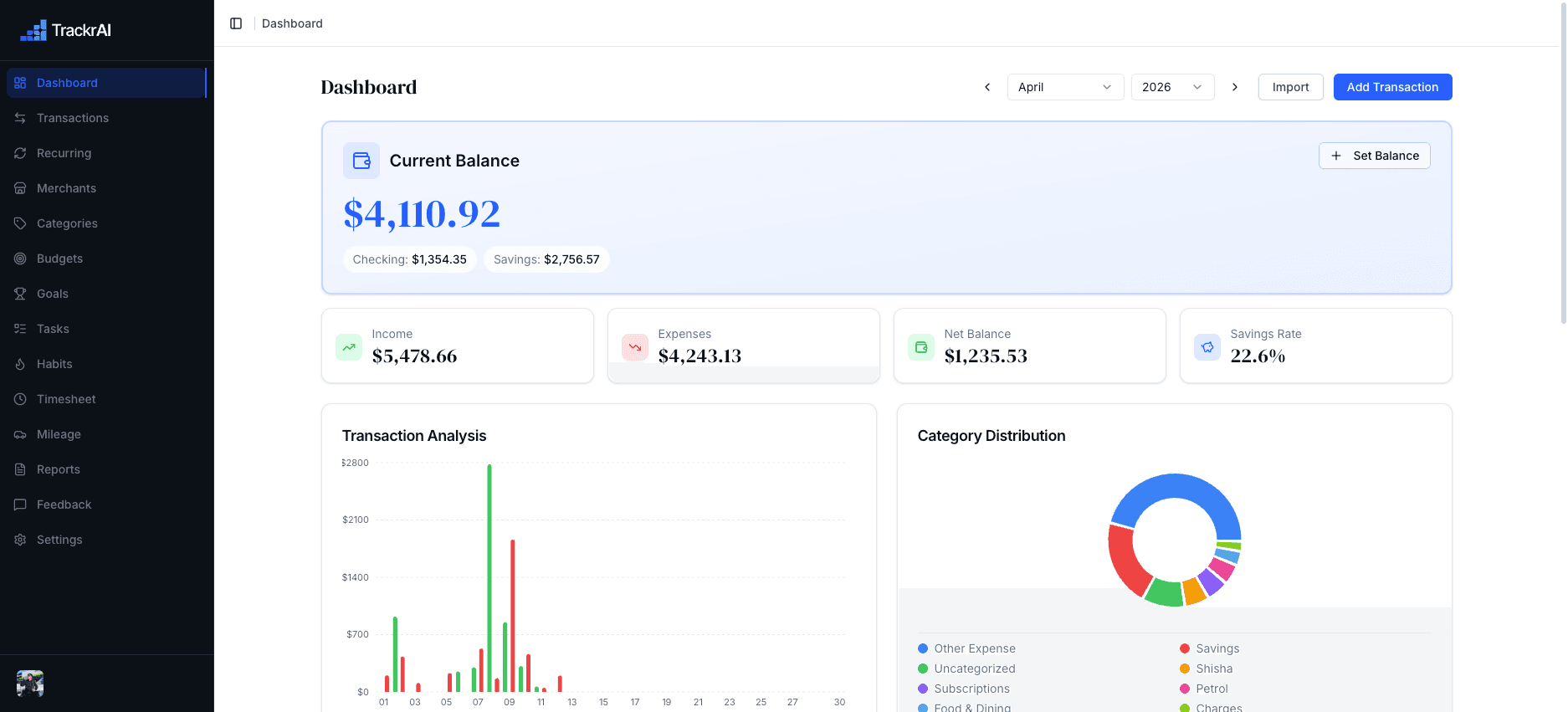
Visualize your spending with powerful analytics
Get deep insights into your financial habits with interactive charts and graphs. Track income vs expenses, analyze spending by category, and monitor your net balance over time.
- Interactive charts with daily, weekly, and monthly views
- Category breakdown with pie charts and bar graphs
- Net balance tracking to monitor financial health
Income vs Expenses
Last 7 months
Total spent this month
$1,080
Recurring Payments
4 activeNetflix
Monthly
$15.99
Rent
Monthly
$1,200
Gym Membership
Monthly
$49.99
Spotify
Monthly
$9.99
Upcoming this week
Never miss a recurring transaction
Set up a recurring bill, subscription, or income entry once and TrackrAI tracks it from that point. Review all upcoming payments in a single list and stop missing charges.
- Automatic tracking of subscriptions and bills
- Predict upcoming transactions with smart forecasting
- Set custom frequencies: daily, weekly, monthly, yearly
Organize expenses by category
See exactly where your money goes with detailed category breakdowns. Create custom categories or use our predefined ones.
- Detailed category breakdown with charts and graphs
- Custom categories tailored to your spending habits
- Spot overruns and stay within your own limits
Categories
This monthFood & Dining
$680
Transportation
$340
Entertainment
$220
Shopping
$450
Healthcare
$120
Utilities
$180
Merchant Manager
8 merchantsAmazon
Shopping
$127.50
Spotify
Entertainment
$9.99
Whole Foods
Groceries
$84.30
Netflix
Entertainment
$47.97
SQ*COFFEE SHOP 34B
No merchant assigned
Amazon
Total spent
$127.50
Transactions
3 this month
Amazon Prime
Mar 1
$14.99
Amazon Order
Mar 8
$67.51
Amazon Order
Mar 12
$45.00
Assign Merchant
SQ*COFFEE SHOP 34B
$6.40 · Mar 15
Suggestions
See exactly who you're spending with
Bank transaction labels are often cryptic or incomplete. TrackrAI lets you create and manage merchants, then assign them to transactions. The result is a cleaner, more accurate picture of your spending.
- Create and organize your own merchant list
- Assign merchants to transactions for instant clarity
- View spending grouped by merchant, not just category
- Make your data cleaner and more useful over time
Your finances summarized, clearly
Generate structured financial summaries for any period you choose. Review income, expenses, top categories, and merchants in one clean overview. Works well for monthly check-ins or year-end planning.
- Period-based reports: weekly, monthly, or custom range
- Breakdown by category, merchant, and transaction type
- Income vs expense overview with net balance
- Export-ready summaries for your own records
Saved Reports
November 2025
$6,200 in · $3,840 out
October 2025
$6,010 in · $4,180 out
September 2025
$5,980 in · $3,650 out
Monthly Summary
November 2025
Income
$6,200
+3.2% vs Oct
Expenses
$3,840
−8.1% vs Oct
Net balance
+$2,360
More than any spreadsheet or free app
TrackrAI combines finance tracking, productivity tools, and tax features that no free alternative offers.
| Feature | Spreadsheets | YNAB | Mint | TrackrAI |
|---|---|---|---|---|
| AI transaction categorisation | ||||
| No bank login required | ||||
| Merchant tracking | ||||
| Recurring transaction automation | ||||
| Financial reports and exports | ||||
| Mobile and web app | ||||
| Row-level data security | ||||
| Budget tracking per category | ||||
| Savings goals with contributions | ||||
| Habit tracking | ||||
| Task management | ||||
| Timesheet and billable hours tracking | ||||
| Mileage tracking with tax rates | ||||
| Transaction tags | ||||
| AI merchant matching | ||||
| CSV import with duplicate detection | ||||
| Preset tax rates ATO IRS HMRC CRA IRD |
Comparison based on publicly available information. Accurate as of March 2026.
What people are saying
See what our customers have to say about TrackrAI.
Uploaded my bank CSV and everything sorted itself in a couple of minutes. The category breakdown made it obvious where my money was actually going.
I can see all my subscriptions in one place now. No more forgetting what I am paying for each month.
Uploaded my bank CSV and everything sorted itself in a couple of minutes. The category breakdown made it obvious where my money was actually going.
I can see all my subscriptions in one place now. No more forgetting what I am paying for each month.
Had about 200 transactions and most got categorised on their own. Only had to fix a handful. Saved me a lot of time.
Set up my regular merchants and now I can see exactly what I spend with each one. My coffee habit was more expensive than I thought.
Had about 200 transactions and most got categorised on their own. Only had to fix a handful. Saved me a lot of time.
Set up my regular merchants and now I can see exactly what I spend with each one. My coffee habit was more expensive than I thought.
I run a report at the end of each month to see where everything went. Really helps with planning the next one.
Really easy to get started. Imported my transactions, set up a few categories, and it just worked. Does exactly what it says.
I run a report at the end of each month to see where everything went. Really helps with planning the next one.
Really easy to get started. Imported my transactions, set up a few categories, and it just worked. Does exactly what it says.
One clear plan for cleaner finances
Get the full TrackrAI workspace: AI categorisation, recurring payments, budgets, reports, and clean records without spreadsheet upkeep.
Built for repeated money reviews
TrackrAI keeps the workflow simple: import your statement, review the AI work, and understand what changed.
AI transaction categorisation
Import CSV transactions and let TrackrAI classify spending automatically.
Recurring payment tracking
Track bills, subscriptions, and income patterns before they surprise you.
Budgets and reports
Review category spend, merchants, and clear period-based summaries.
Cleaner financial records
Keep imported statements, merchant labels, and categories organised in one place.
Common questions
Everything you need to know before getting started
What does TrackrAI do?
TrackrAI tracks your expenses, subscriptions, and recurring payments in one place. You import transactions from your bank via CSV or add them manually, and the AI categorises each one. See your spending by category, merchant, and time period in one dashboard.
How does the AI categorisation work?
When you import transactions, the AI reads each transaction name and assigns a category from your 16 default categories. The assignment happens automatically during import. You review the results and edit any category before saving.
Is my financial data secure?
Supabase stores your data with Row Level Security policies that isolate each user's records from every other account. Only your account accesses your transactions, reports, and settings. TrackrAI never requests or stores your bank credentials.
Do I need to connect my bank account?
TrackrAI does not connect to your bank. You export a CSV from your bank and import it directly. Your bank credentials never leave your computer.
How much does TrackrAI cost?
TrackrAI Pro is $6.99 AUD per month, or $62 AUD per year. The pricing section above shows both options — checkout happens securely in the TrackrAI app.
Can I cancel my subscription?
Yes. Payments are handled through secure Stripe checkout, and you can cancel any time from your account settings.
What file formats does the CSV import support?
TrackrAI accepts standard CSV files, the export format most banks use for account statements. Download your statement from your bank and import the CSV directly. The AI assigns categories to each transaction row during the import.
Is TrackrAI built for personal or business use?
TrackrAI focuses on personal finance. The features cover individual expense tracking, subscriptions, and spending habits. Freelancers also use it to separate personal and business expenses.
Still have questions?
Visit Help CentreReady to understand your money?
Import your latest statement, review the AI categorisation, and keep your financial records clear in one workspace.
Secure checkout. Cancel any time.